Thirty Dollar Tools

Another Medium, covered by t1stm · playing in the Visualizer

Play, edit and export Thirty Dollar Website covers on your own computer, at a higher frame rate, in higher-quality audio, and with note automation for echoes, sustains and fades.

Visualizer

Play a Thirty Dollar Website cover back with no dropped notes.

  • Plays on several CPU threads, so dense covers and particle accelerators stay smooth.
  • Seek, restart and pause from the playback bar at the bottom of the window.
  • Open any .tdw or .🗿 file, or start one from the command line with -i cover.tdw.
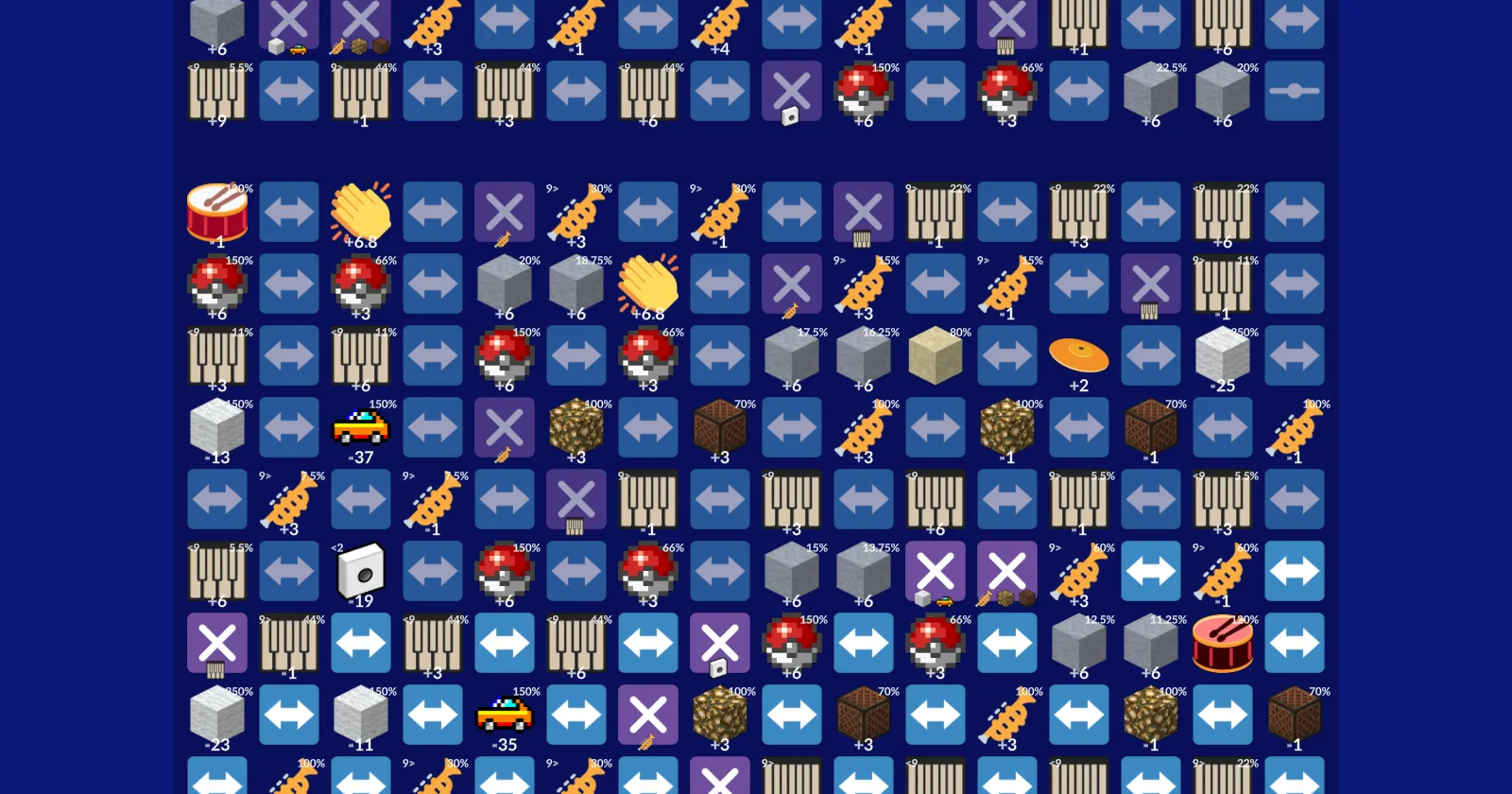
The Visualizer playing TV World: rows of sound tiles with pitch and volume badges on an ultramarine background

Editor

Build a Thirty Dollar Website cover track by track and export it.

Open your existing covers as a project, or start from scratch. Keyboard shortcuts

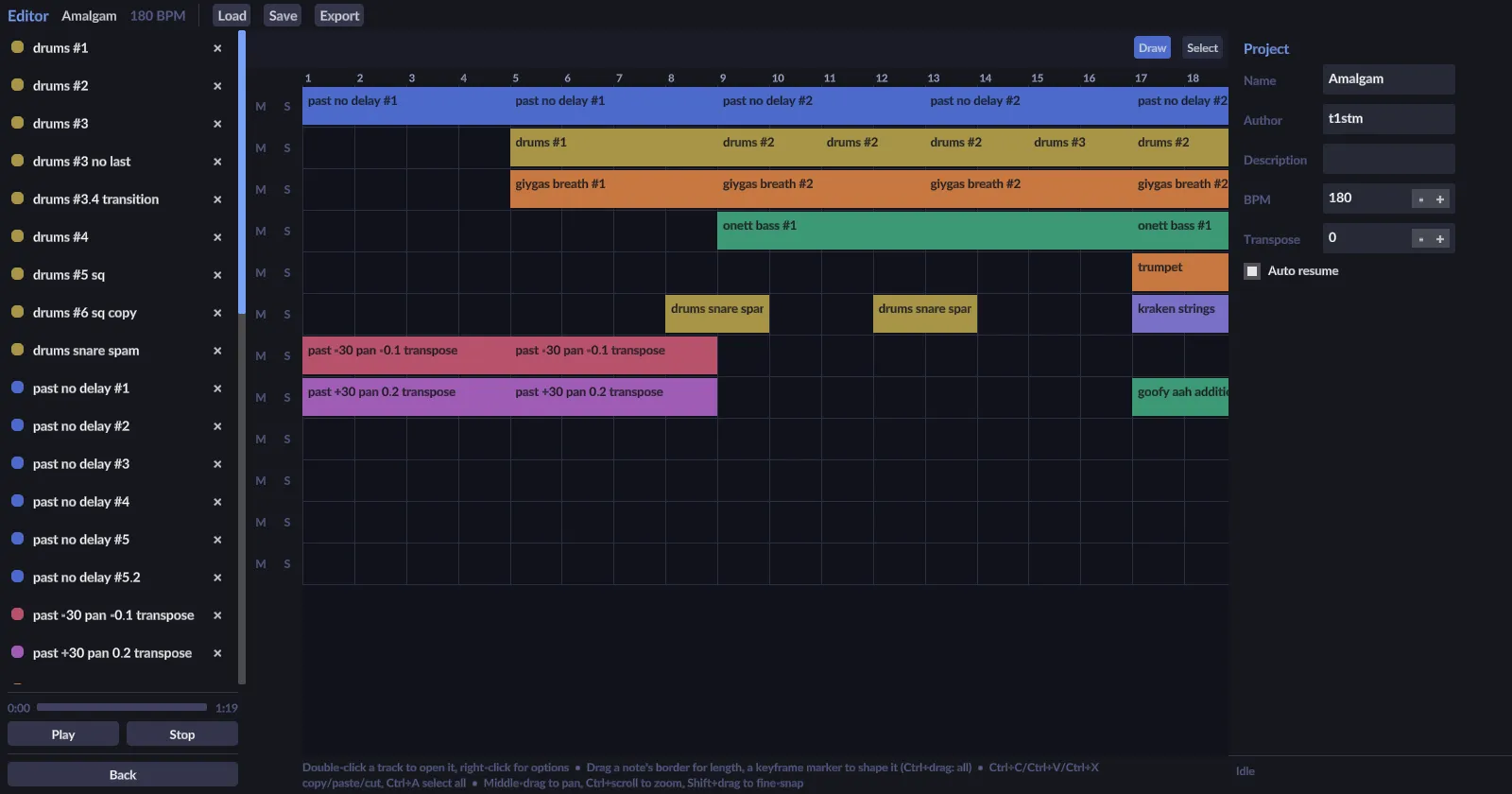
Arrangement of the Amalgam project: coloured clips on tracks across 18 bars
Lay out clips on tracks, like a DAW. The project exports back to a sequence the website can open.

Converter

Turn a Thirty Dollar Website sequence into a WAV file.

  • Exports match the website's sound one to one, panning included.
  • Only your RAM and your patience limit how long a cover can be.
  • Comes with a command-line version for batch jobs:
ThirtyDollarConverter.CLI -i cover.tdw -s 48000
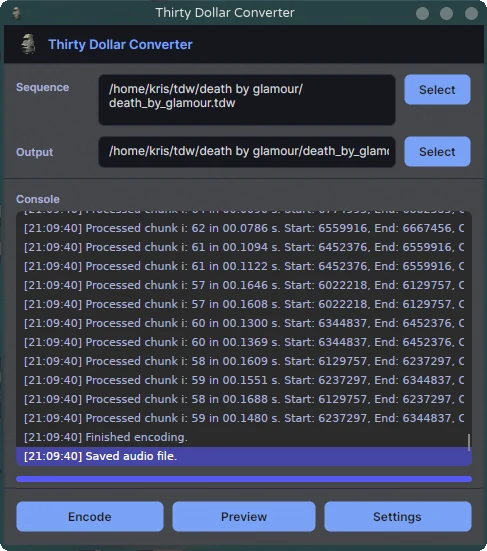
The Converter after exporting Death By Glamour: sequence and output paths, the encoding log ending in "Saved audio file.", and Encode, Preview and Settings buttons

Download

2.0.0 RC 6 · 19 Aug 2026The next version, nearly finished. Report problems on GitHub or in the TDW Discord. Release page ↗

SYSTEMCHIPSIZEDownload
Windowsx6488 MBDownload
Linuxx6485 MBDownload
macOSApple silicon85 MBDownload
macOSIntel88 MBDownload

Each zip has the Visualizer (with the Editor and Drum Master) and the Converter. Unzip and run; the first launch downloads the Thirty Dollar Website's sounds. Debug builds and older versions are on the releases page ↗.

What's new

Thirty Dollar Tools 2.0.0 Release Candidate 6v2.0.0-rc6 · 19 Aug 2026RC

The time has finally come huh? This one is big. I'll make the description of this release shorter and go more in-depth in the actual release (should come when my next cover drops). This one has improvements all over the board for all components, and features a new thing I'll leave for last.

Improvements to the Converter

Gotta start with the thing that began this project. I've made a complete redesign of the styling of the Converter. It should look much more fleshed out.

Screenshot_20260725_210808 Screenshot_20260725_210942

Performance Enhancements

The library that the Converter uses for exporting the raw audio got an additional working mode. This one is called Incremental Audio Export.

The core idea is that you take in an already exported sequence, make changes to it, and then re-render it again. This normally would've costed an entire re-render of the whole sequence. This mode first checks what was changed, subtracts the sound at the location the change was made, and applies the new sound.

This is heavily used in the new version of the Visualizer that will be documented below.

Bug Fixes

I've also fixed many bugs that were plaguing accurate exports compared to the TDW with the most important being the panning calculation method. Currently, sequences exported from the TDW match one-to-one with the ones from the Converter, from the short tests I've made and the limited library of sequences I have. The export should be a lot more faithful to the sound the TDW produces.

invert-example

Improvements to the Custom TDWex Format

Most of the defining features of the TDWex format got actually added to the TDW. Panning and individual sound cutting are now a core feature of the Website. To continue the novelty aspect of the TDWex format, I have added a new sound modifier:

The Offset modifier

This modifier basically offsets the start of the sound by given seconds.

sound@0>0.33 has its start sample offsetted by 0.33 seconds.

It should be a great addition to the already big sound manipulation stack that the TDW has, and bring another level to create complex covers of songs.

Improvements to the Visualizer

This has been the main focus of work since the last release. The graphics engine that the Visualizer uses has been overhauled from the ground up with components and batch rendering in mind. What this means for you is that the Visualizer should use less power when running it and be a lot smoother when playing or working with it.

As for the look, the Visualizer got a Home Screen, and a simple playback controller bar on the bottom of the window. This one allows seeking back and forth, restarting and play-pausing the sequence without having to remember each shortcut manually.

image

Now it's time to mention the main star of the current release, and the reason it took so long.

The Thirty Dollar Editor

I've left the best for last.

The Thirty Dollar Editor is a new asset to the Thirty Dollar Tools. It brings a DAW-like experience but with the twist that projects made in it can be exported in the Thirty Dollar Website afterwards.

image image image image image image image

More information will be added in a later document once the main release drops, but for now you can check out the available keybinds in this file.

I openly invite you to check this mode out and give me your feedback on it. Be it here in the discussion for the release, or in the Thirty Dollar Discord server.

That's it and thank you for reading.

Changes after RC1

I've noticed some bugs with the incremental audio renderer and have now fixed them. I've also added the "Cut Only" and "Cut Last" options in the automation that allow the user to specify that this keyframe will only add a cut event, or that the last beat should be cut after it ends as well.

Changes after RC2

After trying to actually fully create a cover, I've encountered that after some time the incremental renderer becomes really slow. I've reworked it by scrapping half of the new code and just replacing the edited segments with new full render (which causes even higher quality since artifacts from the subtraction and addition will be gone).

I also noticed that I haven't added the ability to use more than one instance of a sound in an interface, so that's also been added.

Changes after RC3

Several QoL changes, bug fixes and first few Claude-only commits, this robot is really good. The version of the Visualizer will constantly be synced with the release it was built on upon build time.

Changes after RC4

Several under-the-hood changes. A built in update checker. Fancy stuff.

Changes after RC5

Reworked the first open experience and the UI of the Loader, Home and Settings pages. Added support for changing the default keybinds and added macOS defaults to use Cmd instead of Ctrl.

Thirty Dollar Tools 2.0.0 Release Candidate 5v2.0.0-rc5 · 10 Aug 2026RC

The time has finally come huh? This one is big. I'll make the description of this release shorter and go more in-depth in the actual release (should come when my next cover drops). This one has improvements all over the board for all components, and features a new thing I'll leave for last.

Improvements to the Converter

Gotta start with the thing that began this project. I've made a complete redesign of the styling of the Converter. It should look much more fleshed out.

Screenshot_20260725_210808 Screenshot_20260725_210942

Performance Enhancements

The library that the Converter uses for exporting the raw audio got an additional working mode. This one is called Incremental Audio Export.

The core idea is that you take in an already exported sequence, make changes to it, and then re-render it again. This normally would've costed an entire re-render of the whole sequence. This mode first checks what was changed, subtracts the sound at the location the change was made, and applies the new sound.

This is heavily used in the new version of the Visualizer that will be documented below.

Bug Fixes

I've also fixed many bugs that were plaguing accurate exports compared to the TDW with the most important being the panning calculation method. Currently, sequences exported from the TDW match one-to-one with the ones from the Converter, from the short tests I've made and the limited library of sequences I have. The export should be a lot more faithful to the sound the TDW produces.

invert-example

Improvements to the Custom TDWex Format

Most of the defining features of the TDWex format got actually added to the TDW. Panning and individual sound cutting are now a core feature of the Website. To continue the novelty aspect of the TDWex format, I have added a new sound modifier:

The Offset modifier

This modifier basically offsets the start of the sound by given seconds.

sound@0>0.33 has its start sample offsetted by 0.33 seconds.

It should be a great addition to the already big sound manipulation stack that the TDW has, and bring another level to create complex covers of songs.

Improvements to the Visualizer

This has been the main focus of work since the last release. The graphics engine that the Visualizer uses has been overhauled from the ground up with components and batch rendering in mind. What this means for you is that the Visualizer should use less power when running it and be a lot smoother when playing or working with it.

As for the look, the Visualizer got a Home Screen, and a simple playback controller bar on the bottom of the window. This one allows seeking back and forth, restarting and play-pausing the sequence without having to remember each shortcut manually.

image

Now it's time to mention the main star of the current release, and the reason it took so long.

The Thirty Dollar Editor

I've left the best for last.

The Thirty Dollar Editor is a new asset to the Thirty Dollar Tools. It brings a DAW-like experience but with the twist that projects made in it can be exported in the Thirty Dollar Website afterwards.

image image image image image image image

More information will be added in a later document once the main release drops, but for now you can check out the available keybinds in this file.

I openly invite you to check this mode out and give me your feedback on it. Be it here in the discussion for the release, or in the Thirty Dollar Discord server.

That's it and thank you for reading.

Changes after RC1

I've noticed some bugs with the incremental audio renderer and have now fixed them. I've also added the "Cut Only" and "Cut Last" options in the automation that allow the user to specify that this keyframe will only add a cut event, or that the last beat should be cut after it ends as well.

Changes after RC2

After trying to actually fully create a cover, I've encountered that after some time the incremental renderer becomes really slow. I've reworked it by scrapping half of the new code and just replacing the edited segments with new full render (which causes even higher quality since artifacts from the subtraction and addition will be gone).

I also noticed that I haven't added the ability to use more than one instance of a sound in an interface, so that's also been added.

Changes after RC3

Several QoL changes, bug fixes and first few Claude-only commits, this robot is really good. The version of the Visualizer will constantly be synced with the release it was built on upon build time.

Changes after RC4

Several under-the-hood changes. A built in update checker. Fancy stuff.

Thirty Dollar Tools 2.0.0 Release Candidate 4v2.0.0-rc4 · 5 Aug 2026RC

The time has finally come huh? This one is big. I'll make the description of this release shorter and go more in-depth in the actual release (should come when my next cover drops). This one has improvements all over the board for all components, and features a new thing I'll leave for last.

Improvements to the Converter

Gotta start with the thing that began this project. I've made a complete redesign of the styling of the Converter. It should look much more fleshed out.

Screenshot_20260725_210808 Screenshot_20260725_210942

Performance Enhancements

The library that the Converter uses for exporting the raw audio got an additional working mode. This one is called Incremental Audio Export.

The core idea is that you take in an already exported sequence, make changes to it, and then re-render it again. This normally would've costed an entire re-render of the whole sequence. This mode first checks what was changed, subtracts the sound at the location the change was made, and applies the new sound.

This is heavily used in the new version of the Visualizer that will be documented below.

Bug Fixes

I've also fixed many bugs that were plaguing accurate exports compared to the TDW with the most important being the panning calculation method. Currently, sequences exported from the TDW match one-to-one with the ones from the Converter, from the short tests I've made and the limited library of sequences I have. The export should be a lot more faithful to the sound the TDW produces.

invert-example

Improvements to the Custom TDWex Format

Most of the defining features of the TDWex format got actually added to the TDW. Panning and individual sound cutting are now a core feature of the Website. To continue the novelty aspect of the TDWex format, I have added a new sound modifier:

The Offset modifier

This modifier basically offsets the start of the sound by given seconds.

sound@0>0.33 has its start sample offsetted by 0.33 seconds.

It should be a great addition to the already big sound manipulation stack that the TDW has, and bring another level to create complex covers of songs.

Improvements to the Visualizer

This has been the main focus of work since the last release. The graphics engine that the Visualizer uses has been overhauled from the ground up with components and batch rendering in mind. What this means for you is that the Visualizer should use less power when running it and be a lot smoother when playing or working with it.

As for the look, the Visualizer got a Home Screen, and a simple playback controller bar on the bottom of the window. This one allows seeking back and forth, restarting and play-pausing the sequence without having to remember each shortcut manually.

image

Now it's time to mention the main star of the current release, and the reason it took so long.

The Thirty Dollar Editor

I've left the best for last.

The Thirty Dollar Editor is a new asset to the Thirty Dollar Tools. It brings a DAW-like experience but with the twist that projects made in it can be exported in the Thirty Dollar Website afterwards.

image image image image image image image

More information will be added in a later document once the main release drops, but for now you can check out the available keybinds in this file.

I openly invite you to check this mode out and give me your feedback on it. Be it here in the discussion for the release, or in the Thirty Dollar Discord server.

That's it and thank you for reading.

Changes after RC1

I've noticed some bugs with the incremental audio renderer and have now fixed them. I've also added the "Cut Only" and "Cut Last" options in the automation that allow the user to specify that this keyframe will only add a cut event, or that the last beat should be cut after it ends as well.

Changes after RC2

After trying to actually fully create a cover, I've encountered that after some time the incremental renderer becomes really slow. I've reworked it by scrapping half of the new code and just replacing the edited segments with new full render (which causes even higher quality since artifacts from the subtraction and addition will be gone).

I also noticed that I haven't added the ability to use more than one instance of a sound in an interface, so that's also been added.

Changes after RC3

Several QoL changes, bug fixes and first few Claude-only commits, this robot is really good. The version of the Visualizer will constantly be synced with the release it was built on upon build time.

Thirty Dollar Tools 2.0.0 Release Candidate 3v2.0.0-rc3 · 27 Jul 2026RC

The time has finally come huh? This one is big. I'll make the description of this release shorter and go more in-depth in the actual release (should come when my next cover drops). This one has improvements all over the board for all components, and features a new thing I'll leave for last.

Improvements to the Converter

Gotta start with the thing that began this project. I've made a complete redesign of the styling of the Converter. It should look much more fleshed out.

Screenshot_20260725_210808 Screenshot_20260725_210942

Performance Enhancements

The library that the Converter uses for exporting the raw audio got an additional working mode. This one is called Incremental Audio Export.

The core idea is that you take in an already exported sequence, make changes to it, and then re-render it again. This normally would've costed an entire re-render of the whole sequence. This mode first checks what was changed, subtracts the sound at the location the change was made, and applies the new sound.

This is heavily used in the new version of the Visualizer that will be documented below.

Bug Fixes

I've also fixed many bugs that were plaguing accurate exports compared to the TDW with the most important being the panning calculation method. Currently, sequences exported from the TDW match one-to-one with the ones from the Converter, from the short tests I've made and the limited library of sequences I have. The export should be a lot more faithful to the sound the TDW produces.

invert-example

Improvements to the Custom TDWex Format

Most of the defining features of the TDWex format got actually added to the TDW. Panning and individual sound cutting are now a core feature of the Website. To continue the novelty aspect of the TDWex format, I have added a new sound modifier:

The Offset modifier

This modifier basically offsets the start of the sound by given seconds.

sound@0>0.33 has its start sample offsetted by 0.33 seconds.

It should be a great addition to the already big sound manipulation stack that the TDW has, and bring another level to create complex covers of songs.

Improvements to the Visualizer

This has been the main focus of work since the last release. The graphics engine that the Visualizer uses has been overhauled from the ground up with components and batch rendering in mind. What this means for you is that the Visualizer should use less power when running it and be a lot smoother when playing or working with it.

As for the look, the Visualizer got a Home Screen, and a simple playback controller bar on the bottom of the window. This one allows seeking back and forth, restarting and play-pausing the sequence without having to remember each shortcut manually.

image

Now it's time to mention the main star of the current release, and the reason it took so long.

The Thirty Dollar Editor

I've left the best for last.

The Thirty Dollar Editor is a new asset to the Thirty Dollar Tools. It brings a DAW-like experience but with the twist that projects made in it can be exported in the Thirty Dollar Website afterwards.

image image image image image image image

More information will be added in a later document once the main release drops, but for now you can check out the available keybinds in this file.

I openly invite you to check this mode out and give me your feedback on it. Be it here in the discussion for the release, or in the Thirty Dollar Discord server.

That's it and thank you for reading.

Changes after RC1

I've noticed some bugs with the incremental audio renderer and have now fixed them. I've also added the "Cut Only" and "Cut Last" options in the automation that allow the user to specify that this keyframe will only add a cut event, or that the last beat should be cut after it ends as well.

Changes after RC2

After trying to actually fully create a cover, I've encountered that after some time the incremental renderer becomes really slow. I've reworked it by scrapping half of the new code and just replacing the edited segments with new full render (which causes even higher quality since artifacts from the subtraction and addition will be gone).

I also noticed that I haven't added the ability to use more than one instance of a sound in an interface, so that's also been added.

Thirty Dollar Tools 2.0.0 Release Candidate 2v2.0.0-rc2 · 26 Jul 2026RC

The time has finally come huh? This one is big. I'll make the description of this release shorter and go more in-depth in the actual release (should come when my next cover drops). This one has improvements all over the board for all components, and features a new thing I'll leave for last.

Improvements to the Converter

Gotta start with the thing that began this project. I've made a complete redesign of the styling of the Converter. It should look much more fleshed out.

Screenshot_20260725_210808 Screenshot_20260725_210942

Performance Enhancements

The library that the Converter uses for exporting the raw audio got an additional working mode. This one is called Incremental Audio Export.

The core idea is that you take in an already exported sequence, make changes to it, and then re-render it again. This normally would've costed an entire re-render of the whole sequence. This mode first checks what was changed, subtracts the sound at the location the change was made, and applies the new sound.

This is heavily used in the new version of the Visualizer that will be documented below.

Bug Fixes

I've also fixed many bugs that were plaguing accurate exports compared to the TDW with the most important being the panning calculation method. Currently, sequences exported from the TDW match one-to-one with the ones from the Converter, from the short tests I've made and the limited library of sequences I have. The export should be a lot more faithful to the sound the TDW produces.

invert-example

Improvements to the Custom TDWex Format

Most of the defining features of the TDWex format got actually added to the TDW. Panning and individual sound cutting are now a core feature of the Website. To continue the novelty aspect of the TDWex format, I have added a new sound modifier:

The Offset modifier

This modifier basically offsets the start of the sound by given seconds.

sound@0>0.33 has its start sample offsetted by 0.33 seconds.

It should be a great addition to the already big sound manipulation stack that the TDW has, and bring another level to create complex covers of songs.

Improvements to the Visualizer

This has been the main focus of work since the last release. The graphics engine that the Visualizer uses has been overhauled from the ground up with components and batch rendering in mind. What this means for you is that the Visualizer should use less power when running it and be a lot smoother when playing or working with it.

As for the look, the Visualizer got a Home Screen, and a simple playback controller bar on the bottom of the window. This one allows seeking back and forth, restarting and play-pausing the sequence without having to remember each shortcut manually.

image

Now it's time to mention the main star of the current release, and the reason it took so long.

The Thirty Dollar Editor

I've left the best for last.

The Thirty Dollar Editor is a new asset to the Thirty Dollar Tools. It brings a DAW-like experience but with the twist that projects made in it can be exported in the Thirty Dollar Website afterwards.

image image image image image image image

More information will be added in a later document once the main release drops, but for now you can check out the available keybinds in this file.

I openly invite you to check this mode out and give me your feedback on it. Be it here in the discussion for the release, or in the Thirty Dollar Discord server.

That's it and thank you for reading.

Changes after RC1

I've noticed some bugs with the incremental audio renderer and have now fixed them. I've also added the "Cut Only" and "Cut Last" options in the automation that allow the user to specify that this keyframe will only add a cut event, or that the last beat should be cut after it ends as well.

Thirty Dollar Tools 2.0.0 Release Candidate 1v2.0.0-rc1 · 25 Jul 2026RC

The time has finally come huh? This one is big. I'll make the description of this release shorter and go more in-depth in the actual release (should come when my next cover drops). This one has improvements all over the board for all components, and features a new thing I'll leave for last.

Improvements to the Converter

Gotta start with the thing that began this project. I've made a complete redesign of the styling of the Converter. It should look much more fleshed out.

Screenshot_20260725_210808 Screenshot_20260725_210942

Performance Enhancements

The library that the Converter uses for exporting the raw audio got an additional working mode. This one is called Incremental Audio Export.

The core idea is that you take in an already exported sequence, make changes to it, and then re-render it again. This normally would've costed an entire re-render of the whole sequence. This mode first checks what was changed, subtracts the sound at the location the change was made, and applies the new sound.

This is heavily used in the new version of the Visualizer that will be documented below.

Bug Fixes

I've also fixed many bugs that were plaguing accurate exports compared to the TDW with the most important being the panning calculation method. Currently, sequences exported from the TDW match one-to-one with the ones from the Converter, from the short tests I've made and the limited library of sequences I have. The export should be a lot more faithful to the sound the TDW produces.

invert-example

Improvements to the Custom TDWex Format

Most of the defining features of the TDWex format got actually added to the TDW. Panning and individual sound cutting are now a core feature of the Website. To continue the novelty aspect of the TDWex format, I have added a new sound modifier:

The Offset modifier

This modifier basically offsets the start of the sound by given seconds.

sound@0>0.33 has its start sample offsetted by 0.33 seconds.

It should be a great addition to the already big sound manipulation stack that the TDW has, and bring another level to create complex covers of songs.

Improvements to the Visualizer

This has been the main focus of work since the last release. The graphics engine that the Visualizer uses has been overhauled from the ground up with components and batch rendering in mind. What this means for you is that the Visualizer should use less power when running it and be a lot smoother when playing or working with it.

As for the look, the Visualizer got a Home Screen, and a simple playback controller bar on the bottom of the window. This one allows seeking back and forth, restarting and play-pausing the sequence without having to remember each shortcut manually.

image

Now it's time to mention the main star of the current release, and the reason it took so long.

The Thirty Dollar Editor

I've left the best for last.

The Thirty Dollar Editor is a new asset to the Thirty Dollar Tools. It brings a DAW-like experience but with the twist that projects made in it can be exported in the Thirty Dollar Website afterwards.

image image image image image image image

More information will be added in a later document once the main release drops, but for now you can check out the available keybinds in this file.

I openly invite you to check this mode out and give me your feedback on it. Be it here in the discussion for the release, or in the Thirty Dollar Discord server.

That's it and thank you for reading.

1.1.6 Bug Fix and QoL Releasev1.1.6 · 17 Sept 2024

Some Bug Fixes and QoL improvements.

I've noticed some problems that were of medium severity but I still couldn't ignore them, so I made this release.
In this release I've also bundled some interesting stuff, which were meant to be included in the 2.0.0 version but are ready now, so I just included them to not worry about separating branches and other stuff.

Important Note

I've modified the GitHub repository to generate a new build every update I make to this project.
It's marked as a pre-release: https://github.com/t1stm/ThirtyDollarTools/releases/

What's Added? (in plain terms)

  • A higher quality resampler in the Converter. (Bandlimited Resampler)
  • A settings file for the Visualizer.
  • Ability to make the Visualizer's window be transparent. Documented below.
  • Support for using defined events in other #define events. Documented below too.
  • Fixed the scaling on displays bigger and smaller than 1x.
  • Performance improvements. (there can never be too many)

How to use the transparency.

First you need to open the Visualizer's settings file.
image

And edit the TransparentFramebuffer = False line. Set "False" to "True"
image
image

Open the Visualizer. The background won't be transparent unless explicitly being told to be.
image

You'll need to manually edit the !bg (background) events of your sequences so that they contain the transparency information too. Here's an example.

You have this file, which has a single !bg event followed by four pauses.
It looks like this: !bg@#2087ee,0|_pause=4.

When played in the Visualizer it looks like this.
image

Now to add transparency (alpha) to the background you can add two more hex letters after the color, with ranges from 00 (0) to FF (255). 00 is fully transparent and FF is fully opaque. By default all backgrounds have FF values unless manually set.

Let's say that you want the background to be fully transparent.
You can edit the line above to look like this: !bg@#2087ee00,0|_pause=4. The difference is the added 00 after ee.
The color doesn't really matter in this case since it's fully transparent, and even if it's black, it'll still be transparent.

Here's how the Visualizer looks like now.
image
Note: I am using blurring on all transparent windows, on my setup. On your setup you will most likely see it without any background blurring.

You can change the value to something in-between to use to your liking.

Now you can capture the Visualizer's window directly in OBS and put a source below the Visualizer's window and it'll be visible.
image

That's all for this section.

What do you mean defines in defines?

You can now use defined elements in other new defined elements. Note: The defined element used in the new define must be defined first. Otherwise it'll be parsed as a sound.

What's Changed (in GitHub terms)

  • Merge part of the abstracted events to master for the world to see! by @t1stm in #36
  • Rewrote the Audio Casting code. by @t1stm in #37
  • Change the solution's folder structure by @t1stm in #38
  • 1.1.6 Bug Fix and QoL release (miscellaneous stuff) by @t1stm in #41

I've taken a small break developing these tools but fear not, as I will be returning soon to developing them. When I am finished the result will be great. Thanks for reading this and I hope you have a nice day / night.

Full Changelog: v1.1.5...v1.1.6

1.1.5 Minor Releasev1.1.5 · 4 Jul 2024

Probably the last 1.1.x Release.

This will probably be the last of the 1.1.x releases, since I've started doing major changes that don't fit into this version tag.

The Future:

I am preparing this project for something that I think a lot of Thirty Dollar creators will appreciate, but in order for that to happen, I need to refactor most of the code base. I've started working on it, but I cannot say if I'll be successful in making these changes, or whether I'll have the drive to finish it all. The work will probably take a couple of months, in order for a beta to be pushed out to some special people. This is all I can say for now.

What's Changed (GitHub terms)

  • Merge some of the fixes from the Abstraction branch to the master branch. by @t1stm in #34

In detail (Explained normally):

  • Normalized the way the camera behaves for PCs with lower CPU performance. The visualizer should look the same on every computer now.
  • Changed how background changing is handled. (I haven't tested it much for any bugs, but from all the sequences I have on my computer, all backgrounds were handled normally, just like how you'd expect them to be...)

Thanks for reading this and I hope you have a nice day / night.

Full Changelog: v1.1.4...v1.1.5

All releases on GitHub ↗